Outcome Analytics For Your Job Search: Track What Actually Gets Interviews
Use outcome analytics to measure job-search conversion, spot stronger resume workflows, and improve interview results over time.
Outcome analytics helps you measure which resumes, roles, and application patterns are leading to interviews instead of relying on memory or assumptions. In a modern job search, that matters because candidates are not only competing on experience. They are also competing on how clearly they present that experience, how quickly they adapt it to a role, and how well they learn from application results.
Why This Tool Matters
Most job seekers track effort, not outcomes. They remember how many roles they applied to, but not which resume version, target role, or application strategy actually converted best. Analytics matters because feedback loops create better decisions.
ATS Resume Impact
ATS performance often reveals itself indirectly through outcomes. If one resume version consistently produces no movement while another gets screening calls, that pattern can point to differences in keyword alignment, clarity, or role targeting.
Recruiter Psychology Impact
Recruiter behavior also leaves signals. If certain roles lead to faster callbacks or stronger interview conversion, your materials may be resonating better in those segments. Analytics helps you notice those patterns early.
When You Should Use This Tool
Use outcome analytics after you have been applying long enough to collect data, or anytime you are testing different resume versions, role families, or workflows.
How To Use It Step By Step
- track applications by role, stage, and resume version instead of storing only job titles
- review where applications stall, such as saved-to-applied or interview-to-offer drop-off
- compare performance across resume versions and role categories
- look for trends rather than reacting to one isolated rejection
- use the findings to adjust targeting, resume emphasis, or interview preparation
- repeat the cycle so your job search becomes more evidence-based over time
A Practical Example
You may discover that your operations-focused resume gets more recruiter responses than your broader business resume, or that one company segment responds better to a shorter summary and more metrics-heavy bullets. Without analytics, those insights are easy to miss.
Common Mistakes To Avoid
- collecting data without acting on it
- drawing conclusions from too few applications
- tracking only volume and ignoring conversion by version or role
- failing to connect application outcomes back to the actual resume that was submitted
The Real Impact On Your Job Search
Analytics changes the job search from a guessing game into a learning system. That makes it easier to double down on what works and stop repeating weak application patterns.
Use SmartResumeAnalyzer To Turn Insight Into Action
SmartResumeAnalyzer can support a smarter feedback loop by helping you connect resume versions, targeting decisions, and application outcomes in one clearer workflow.
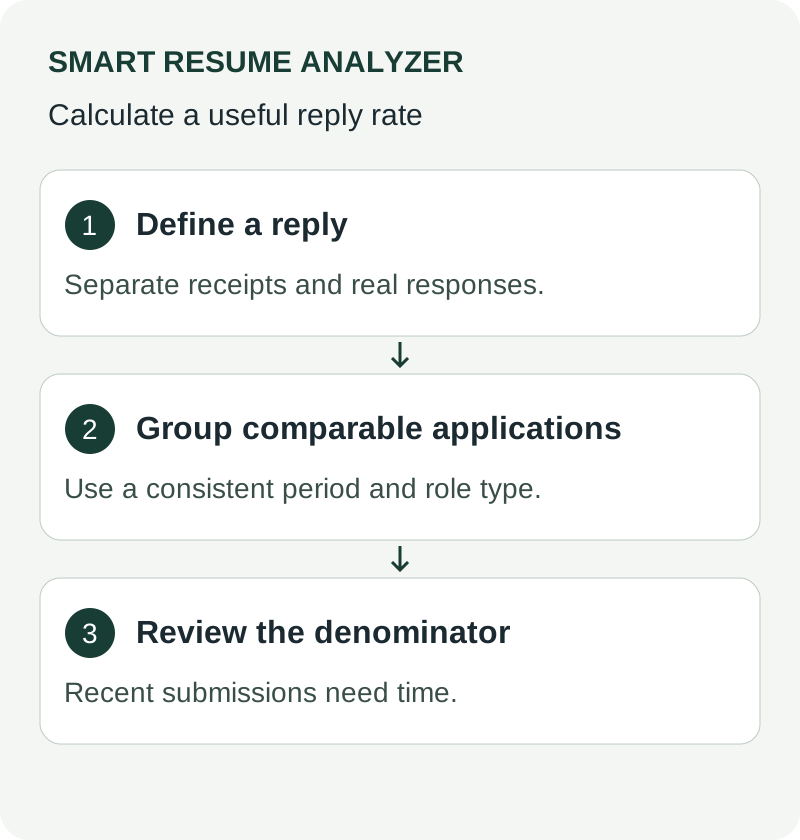
## Job Application Response Rate: Track Replies and Improve Your Follow-up Define a response before calculating a rate. For example, count a personal recruiter reply or interview invitation as a response, while keeping automatic receipt messages separate. In an illustrative cohort of 20 applications sent during the same period, 4 substantive replies produce a 20% response rate: replies divided by applications, multiplied by 100. This is arithmetic, not a market benchmark. Separate advertised applications from unsolicited approaches, track interview invitations separately, and allow enough time for recent submissions to receive replies. Small samples and different roles make comparisons noisy. Use the existing application tracker and outcome tools; this guide does not add a new response-rate calculator. [Further guidance: CareerOneStop resume guide](https://cloudfront.careeronestop.org/JobSearch/Resumes/ResumeGuide/introduction.aspx?frd=true)Use These Tools Next
Use a working tool to apply this guidance to your own resume or job description.
Related Resume Pages
Explore related keyword and resume guidance pages to keep improving your application materials.
Using this guidance
Use these guides to check a specific part of your application. Automated feedback is guidance, not a hiring prediction. Check suggested edits against your own experience.
Related Articles
Continue with another guide on this topic.
Resume Best Practices
Your Email Address Might Be Costing You Interviews
An unprofessional email address can weaken credibility immediately, even before recruiters review your resume in detail.
Job Applications
Cover Letter Mastery 2025: Write Compelling Letters That Get Interviews
A good cover letter in 2025 is short, specific, and built around the exact role instead of repeating the resume.
Career Advice
Recruiters Don’t Trust Your Resume: The Danger of Exaggeration
Recruiters don’t trust your resume because everything sounds exaggerated. If it feels unrealistic, they assume it’s not true. Be specific and realistic with your claims to build credibility.