ATS Resume Formatting and Word-Count Rules
Parser-safe formatting rules and realistic word counts per section, so an ATS reads every part of the resume you actually wrote.
Introduction: The Hook
A polished resume can still fail in an ATS. That happens fast. Tiny layout choices, odd file types, and crowded sections can confuse the parser before a recruiter ever sees your name.
Job seekers often ask the wrong question. They ask for a “pretty” resume, then wonder why the ATS resume loses structure. The better question is simple: what should a resume look like when both software and people read it?
This guide gives you that answer. You will see how to format margins, fonts, sections, bullets, and file types. You will also get practical do and don’t checklists, plus simple examples you can use right away.
Key takeaways:
Keep your resume ATS friendly by using clean formatting, a clear section order, readable fonts, and standard file types. Avoid tables, text boxes, images, and layout tricks that can confuse an ATS resume parser. Keep bullets short. Keep sections simple. Make the content easy to scan by both software and recruiters.
What does ATS-safe resume formatting actually mean?
An ATS is software that reads and organizes resume content. It helps employers sort applications before human review. A good ATS resume format keeps the content easy to parse and easy to read.
That means your resume should follow a simple structure. Use standard section headings. Keep the layout clean. Use formatting that travels well when uploaded, copied, or converted.
A parser-safe resume does not need to look plain. It needs to look orderly. The goal is clarity, not decoration. When a resume builder supports clean exports, that helps reduce formatting problems from the start.
Why recruiters still care about readability
Software is only the first gate. Recruiters still review the final document. A resume that reads cleanly for one audience often works better for the other.
That is why the best resume ATS formatting serves both sides. The parser can detect the text. The person can follow the story. When those two goals align, your resume has a better chance of working as intended.
Key points:
- Use standard headings and simple structure.
- Keep content easy to read after upload.
- Avoid design elements that may break parsing.
- Treat the parser and recruiter as two readers.
What margins and fonts work best for an ATS resume?
Margins and fonts often feel like small details. They matter more than many job seekers expect. Crowded pages can look difficult to scan, while unusual fonts can make text look inconsistent.
A simple resume format works best. Use normal page margins. Keep spacing balanced. Choose a font that is easy to read, and avoid decorative styles that reduce clarity.
The best font choice is usually the one that disappears into the content. You want the words to stand out, not the typeface. That helps both the parser and the recruiter stay focused on the information.
Simple formatting rules to keep in mind
- Keep margins consistent on every page.
- Use one readable font across the resume.
- Avoid tiny text that strains the eye.
- Use spacing to separate sections clearly.
Short lines help too. Dense text can look overwhelming. A clean page feels easier to process, even before anyone reads the details.
What section order should an ATS resume follow?
Section order matters because ATS resume parser tools look for predictable patterns. When the structure is standard, the software can place information in the right place. When the order is unusual, parsing risk goes up.
Start with your contact details. Then move into your professional summary or headline, followed by work experience, skills, education, and other relevant sections. Keep the structure simple and consistent.
Do not hide important details in design blocks or side areas. Put core information in the main flow. That makes the resume easier to read and easier to parse.
A straightforward ATS-friendly section order
- Contact information
- Professional summary
- Work experience
- Skills
- Education
- Certifications or other relevant sections
This order works because it matches common recruiting expectations. It also keeps the resume logical. Readers should not have to search for your background.
What to include in each section
Use standard labels. “Experience” works better than a creative title. “Skills” works better than a stylized heading. Clear labels reduce confusion.
Keep each section focused. Add only information that supports the role. A compact, relevant resume usually performs better than a crowded one.
How long should bullet points and resume content be?
Word count matters, but not in the way many people think. There is no magic number that guarantees success. Instead, the goal is controlled, useful content.
Long bullets can bury the important details. Short bullets can feel incomplete. The best approach is usually concise sentences that show action and relevance. Keep each bullet focused on one point.
A good ATS resume does not need wall-to-wall prose. It needs enough detail to explain what you did and what tools or responsibilities mattered.
A simple bullet rule
Aim for bullets that are one to two lines when possible. That keeps them readable. It also helps the file stay easy to scan.
Use action verbs. Keep one idea per bullet. Remove extra filler words whenever the sentence still makes sense.
Example of a stronger bullet
- Managed resume screening workflows and improved consistency in candidate review.
Example of a weaker bullet
- Responsible for a variety of tasks related to hiring support, candidate coordination, and document handling across several workflows and internal processes.
The first version is cleaner. The second version hides the point.
What about overall word count?
A resume does not need a huge word count to work. It needs enough content to show fit. Keep the language direct and relevant. Remove repetition across summaries, bullets, and skills.
Your resume builder choice matters here, too. A structured builder can help you keep content organized and reduce accidental clutter. That is useful when you want a parser-safe export.
Which file types are safest for ATS uploads?
File type affects how a resume travels between systems. Some formats preserve structure better than others. Others can lose alignment or confuse the parser.
Choose a file type that keeps the text stable. The file should open cleanly, upload cleanly, and preserve the section order. If the formatting changes after export, the reading experience may suffer.
Use a format that is widely accepted and easy to process. That is the simplest rule.
File-type checklist
- Save in a standard format that preserves text.
- Test the exported file before applying.
- Review the resume after download or conversion.
- Make sure headings and bullets still appear correctly.
If you use a resume builder, test the final export. A builder is only useful when the output stays clean. The last file matters more than the draft screen.
What formatting mistakes break ATS resume parsing?
Many formatting issues come from trying to make the resume look unique. Unfortunately, the same choices that make a resume look stylish can make it harder for software to read.
Tables can split content. Text boxes can hide text from the parser. Images can create missing information. Columns may also cause issues if the content order becomes unclear.
Keep the design simple. That is the safest route. A clear resume ATS format gives the parser less room to make mistakes.
Common mistakes to avoid
- Using tables for core content
- Placing text inside shapes or text boxes
- Adding images or icons where text should be
- Using multiple columns that disrupt reading order
- Hiding contact details in headers or sidebars
- Choosing unusual fonts or tiny font sizes
Some candidates also over-format section titles. That can create clutter. The cleaner the structure, the better.
Pull quote:
A resume should organize your experience, not decorate it.
A note on keyword stuffing
Keywords matter. Stuffing does not help. Add relevant terms naturally in context. Include skills and experience that match the role. Use the job description as your guide, but keep the wording human.
That balance matters for both the ATS and the recruiter.
What simple templates work best for parser-safe resumes?
Templates can help when they stay clean. The best templates usually keep structure simple and avoid visual extras that interfere with parsing. A good template should support clear sections, visible headings, and easy export.
A resume builder with clean template options can save time. It helps job seekers avoid layout mistakes while still producing a professional-looking document. That is especially useful for people who want a quick, practical format.
Template types that usually work well
1. Classic single-column template
This is the safest choice for many applicants. It keeps the reading order simple. It also works well when you want a standard ATS resume layout.
2. Minimal template with clear headings
This style keeps the page uncluttered. It gives enough structure without adding extra visual noise. It is a good fit for applicants who want a modern look without risking parsing issues.
3. Resume builder template with export control
A structured resume builder can help you create and export a cleaner file. It lets you focus on content first, then formatting. That workflow works well when you want consistency.
What to look for in a template
- Clear section headings
- Simple spacing
- Easy-to-read fonts
- Clean export options
- No unnecessary graphics
The best template is the one that preserves your content. Style should support the message, not compete with it.
How can you check whether your resume is parser-safe?
You do not need guesswork. Check the file before you send it. A quick review can catch problems early.
Start by opening the exported file. Read it top to bottom. Make sure the contact information appears correctly. Check the section order. Confirm that bullets, dates, and job titles still look clean.
Use an ATS resume parser or analyzer when available. That gives you a practical view of how the file may be read. It is a useful step before applying.
Simple self-check list
- Does the resume open cleanly?
- Does the text appear in the right order?
- Are section headings easy to spot?
- Do bullets stay readable?
- Are any parts missing after export?
If the answer to any of those questions is no, revise the file before submitting. Small fixes can prevent big problems.
Do and don’t checklist for ATS resume formatting
Do
- Use standard section headings
- Keep margins and spacing consistent
- Choose readable fonts
- Keep bullet points concise
- Save in a stable file format
- Test the final export
- Use relevant keywords naturally
- Keep the layout simple and ordered
Don’t
- Use tables for core content
- Place content inside text boxes
- Add images where text belongs
- Overuse columns that disrupt order
- Hide details in unusual design areas
- Fill the resume with keyword repetition
- Use decorative fonts or tiny text
- Assume a pretty layout is parser-safe
These rules are simple because the problem is simple. The best resume format removes friction.
Final takeaway and next step
A strong ATS resume does not need fancy design. It needs clear structure, readable formatting, and content that an ATS resume parser can process without confusion. Margins, fonts, section order, bullets, file type, and template choice all affect that outcome.
The safest approach is practical. Keep the resume simple. Test the export. Review the file as if software and a recruiter will both read it, because they will.
Next step: use Smart Resume Analyzer to check your ATS score, review parsing issues, and compare your resume against a job description before you apply. If you are rebuilding your file, start with a clean resume builder workflow, then export and test the final version.
Call to action: Get started with Smart Resume Analyzer and turn formatting guesswork into a clearer application process.
Related Resources:
- Free AI Resume Analyzer at Smart
- Resume Builder with templates and autofill
- Job-description matcher
- Cover letter builder
- Editorial blog and help center
Check your resume
Run the finished file through the ATS resume checker before you apply, so you can see what an employer's system recovers from it rather than guessing.
Printable formatting checks
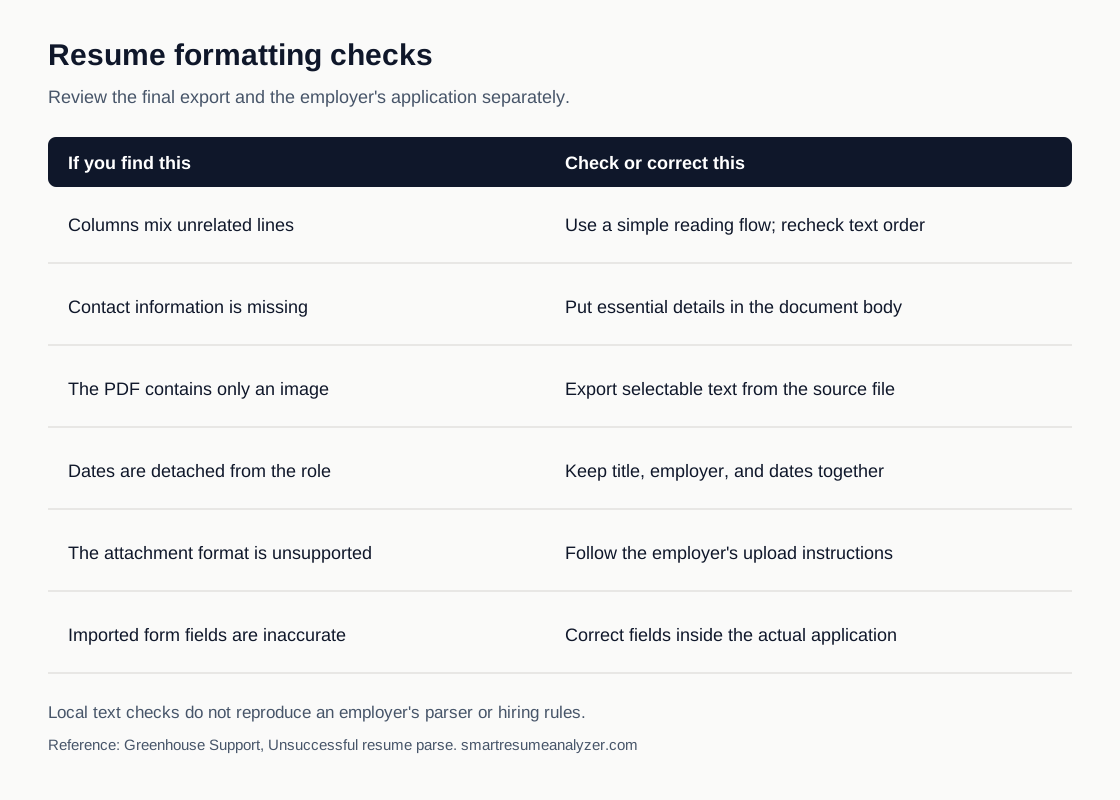
Download the formatting checklist graphic. Review the final export and the actual form separately. The graphic summarizes practical checks, not a guaranteed employer ATS result. Greenhouse support documents some layout-related parsing problems and the need to correct incomplete fields.
Use These Tools Next
Use a working tool to apply this guidance to your own resume or job description.
Related Resume Pages
Explore related keyword and resume guidance pages to keep improving your application materials.
Using this guidance
Use these guides to check a specific part of your application. Automated feedback is guidance, not a hiring prediction. Check suggested edits against your own experience.
Related Articles
Continue with another guide on this topic.
Resume Tools
AI Resume Analyzer vs Resume Checker vs Resume Scanner: What Job Seekers Are Really Looking For
Searches for AI resume analyzer, checker, scanner, screener, resume analyser, cv analyzer, and AI resume screening free usually reflect one goal: better ATS readability and clearer edits.
AI & Technology
AI Resume Analyzer 2025: Understanding ATS Systems and Resume Optimization
AI resume analysis is most valuable when it speeds up revision loops and points to better edits, not just better scores.
Resume Tools
AI Resume Analyzer vs Resume Builder: What Job Seekers Actually Need
Resume builders help you create a draft. Resume analyzers help you improve one. Job seekers usually need both at different moments.