Cover Letter Google Docs Template Guide
Find a cover letter Google Docs template, learn the right structure, and turn a simple draft into a polished application faster.
Introduction
A blank page slows down good applicants. So does a messy format. Many job seekers open Google Docs, search for a cover letter Google Docs template, and still end up guessing what to write.
The goal is simple. You want a clean layout, fast drafting, and a letter that supports your application. That is where a well-structured template helps. It gives you a starting point, keeps the format readable, and makes editing easier before you send or export.
This guide shows what a solid cover letter format should include, how to use a template without sounding generic, and why a cover letter builder can help you move from draft to final version with less friction.
What should a cover letter Google Docs template include?
A good template should be easy to read and simple to edit. It should leave space for your contact details, the employer’s information, a greeting, a short opening, body paragraphs, and a closing.
The format matters. Recruiters scan quickly. A cluttered layout can distract from your message. A plain, structured template keeps attention on your fit for the role.
A strong cover letter generator or template also helps you stay consistent. You do not need fancy graphics or heavy styling. You need a clear page that supports your story and matches the job you want.
A practical template structure
Use a format that follows this flow:
- Your name and contact details
- Today’s date
- Employer name and company details
- Greeting
- Opening paragraph
- Two short body paragraphs
- Closing paragraph
- Sign-off
Key points:
- Keep the layout simple.
- Leave white space for readability.
- Make the letter easy to update for each role.
- Focus on plain formatting over decoration.
Why do people search for a Google Docs template first?
Many job seekers want speed. They want something they can open, edit, and send without learning new software. Google Docs feels familiar, and that lowers the barrier to starting.
A template also reduces decision fatigue. You do not have to think about margins, spacing, or where each section should go. You can focus on content instead. That matters when you are applying to multiple jobs.
Still, a template alone does not solve the full problem. You may have the structure, but you still need wording that is specific to the role. That is where cover letter drafting becomes the real work.
Where templates help, and where they fall short
Templates help with:
- Format
- Speed
- Consistency
- Basic organization
Templates fall short when:
- The wording feels generic
- The letter does not match the role
- You need to revise quickly for multiple applications
- You want the letter to align with your resume
A resume and cover letter builder helps close that gap by bringing structure and content together in one workflow.
How do you make a template sound like you, not everyone else?
Start with the job itself. Read the description. Look for the main responsibilities, required skills, and the language the employer uses. Then use your own experience to connect the dots.
A strong opening should do more than say you are applying. It should show why you are interested and why your background fits. Short sentences work well here. They feel direct.
The body should stay focused. Pick two or three points that support your fit. Use the same terms the employer uses when they match your real experience. That helps your letter feel aligned without sounding copied.
A simple drafting approach
Try this sequence:
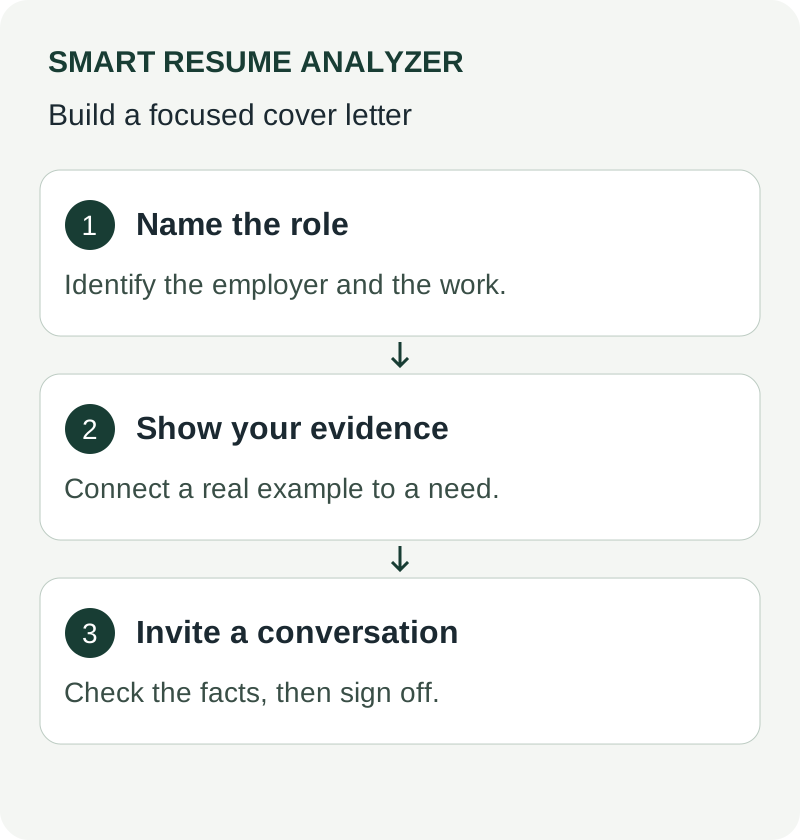
- State the role you want.
- Mention one relevant strength.
- Add one example of experience.
- Close with interest in moving forward.
That structure keeps the letter short and useful. It also makes revision easier because each sentence has a job.
A cover letter builder can support this process by giving you a starting draft you can refine. Our cover letter builder and cover letter generator solutions are built to help job seekers move faster from draft to application-ready form.
What makes a cover letter useful for ATS-focused applications?
A cover letter is not the same as a resume, but clarity still matters. Clean formatting helps the reader follow your message. Simple language makes the letter easier to review.
When you pair your letter with a resume, consistency matters. The job title, the company name, and the skills you mention should make sense together. A mismatch can create confusion.
That is why many customers use a resume builder together with a cover letter builder. It keeps the application materials aligned. It also helps you stay organized when you are applying to several roles.
Smart ways to stay consistent
Use the same:
- Job title
- Company name
- Key skills
- Tone and level of formality
Review both files before exporting. Look for spelling errors, formatting changes, and outdated details. A good template can help, but final review still matters.
How can Smart help you move from template to final draft?
Smart Resume Analyzer offers a free AI resume analyzer and ATS checker. It also includes resume parsing and ATS readability reports, a resume builder with templates and autofill, a cover letter builder with AI draft generation, a job-description matcher, skills and keyword extraction guidance, and exportable reports in PDF, DOC, and TXT.
That means you can do more than start with a Google Docs layout. You can analyze, build, compare, and export in one place. For many customers, that reduces the back-and-forth between tools.
The workflow is practical. Run an analysis. Review the report. Adjust the wording. Then build your final documents. If you need both documents together, the resume and cover letter builder makes that process more manageable.
Why this matters for job seekers
A template gives you a page. A builder helps you finish the page.
That difference matters when you need:
- Faster drafting
- Better structure
- Easier edits
- Cleaner exports
The platform also supports a job-description matcher. That helps you compare your resume to the role and make concrete edits before you send any application.
A template saves time. A guided workflow saves more time when every application needs a few targeted changes.
What should you avoid when using a Google Docs template?
Templates can create a false sense of completion. A polished layout is useful, but it does not replace tailored content. If your letter sounds broad, it may not help your application.
Avoid overloading the page. Long paragraphs make scanning harder. Dense text can bury your strongest points. Short, direct paragraphs are easier to read.
Avoid copying generic examples word for word. That often leads to weak language and vague claims. A better approach is to use the structure, then rewrite the details so they reflect your experience.
Common mistakes to watch for
- Using the same letter for every application
- Leaving placeholder text in the final version
- Making the formatting too decorative
- Writing paragraphs that are too long
- Forgetting to align the letter with the resume
A good cover letter generator can help you start faster. The final result still needs your review.
What is the fastest way to turn a template into an application-ready letter?
Start with a format that already works. Then fill in the content with specific details from the job description and your own background. After that, review the letter for clarity and fit.
If you want a smoother workflow, use a tool that combines analysis and drafting. Smart Resume Analyzer offers resume parsing, ATS readability reports, job-description matching, and a cover letter builder with AI draft generation. That lets you move from review to rewrite without switching between too many tools.
A resume builder also helps if your resume needs updates before you finish the letter. The two documents should support each other. When they do, your application feels more complete and easier to follow.
A simple finish checklist
Before you send, check:
- Names and titles
- Spelling and grammar
- Alignment between resume and cover letter
- File format and export quality
- Clarity of the closing paragraph
That final review is quick. It also catches the mistakes that template users often miss.
Conclusion: The best template is the one you can actually use
A cover letter Google Docs template is useful when it gives you speed and structure. It works best when it is simple, readable, and easy to adapt for each role.
The template is only the first step. The real value comes from turning that layout into a clear, tailored letter that matches your resume and the job description. That is where a cover letter builder, cover letter generator, and resume builder can help you move faster.
If you want a practical next step, try Smart Resume Analyzer to review your resume, compare it to a role, and build a stronger cover letter from there. Start with the tools that help you write less guesswork and more useful content.
Call to Action
Ready to draft your cover letter faster?
Try Smart Resume Analyzer to analyze your resume, build your cover letter, and export polished application materials.
Related tools
Use These Tools Next
Use a working tool to apply this guidance to your own resume or job description.
Related Resume Pages
Explore related keyword and resume guidance pages to keep improving your application materials.
Using this guidance
Use these guides to check a specific part of your application. Automated feedback is guidance, not a hiring prediction. Check suggested edits against your own experience.
Related Articles
Continue with another guide on this topic.
Cover Letters
Cover Letter Templates That Help You Apply Faster
Cover letter templates that help you apply faster, with a simple ATS-friendly structure you can tailor to any job in minutes.
Cover Letters
Cover Letter Format Free: A Simple Guide
Learn the best cover letter format free. Build a clearer, tailored cover letter with simple structure, ATS-friendly writing, and fast editing tips.
Cover Letters
MS Word Cover Letter Template: Download and Customize
Use a simple Word-compatible cover-letter starter, replace its prompts with evidence, and check the final page before exporting or uploading.