Cover Letter Templates That Help You Apply Faster
Cover letter templates that help you apply faster, with a simple ATS-friendly structure you can tailor to any job in minutes.
Introduction
A blank page slows people down. So does a generic letter.
Job seekers often know what they want to say. They just do not know how to shape it fast. That is where cover letter templates help. They give you structure, save time, and keep your message clear.
The challenge is simple. A template only helps if it leads to a tailored cover letter. Otherwise, it reads like a copy-and-paste exercise. This guide shows how to use templates well, when to move beyond them, and how a cover letter builder or cover letter generator can support the process.
What should a good cover letter template do?
A strong template gives you a starting point, not a finished answer. It should help you open clearly, connect your experience to the role, and close with purpose.
Good templates reduce friction. They keep you from staring at an empty document. They also make it easier to stay organized while you prepare each application.
A weak template does the opposite. It creates filler. It encourages vague language. It makes every letter sound the same.
The best templates support drafting, not shortcutting
The real value of cover letter drafting is clarity. You want a structure that helps you make choices faster. You do not want a script that decides for you.
Look for templates that leave room for:
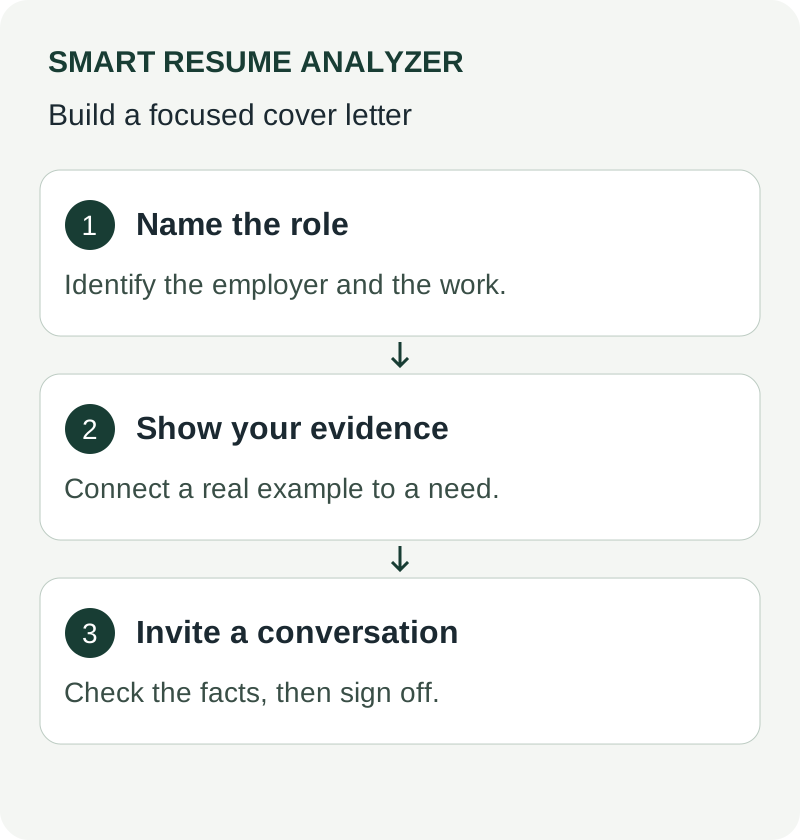
- A short opening that names the role
- A middle section tied to the job you want
- A closing that feels specific
- Easy editing before you export or send
A template should help you write less guesswork. It should not hide the work.
Why do templates matter if you already know what to say?
Many job seekers know their story. They have the skills. They have the experience. They still lose time because every application asks for a slightly different version of the same message.
That is why templates matter. They create repeatable structure. They make it easier to start quickly and revise with purpose.
Templates are especially useful when you need to submit many applications. You can keep the core format steady while adapting the details for each role. That balance saves time without making your letter feel generic.
A template also helps with consistency. If you keep changing tone, length, and layout, your applications can feel scattered. A clear format keeps you focused.
How do you turn a template into a tailored cover letter?
This is where most people miss the mark. They fill in the blanks and stop there. A stronger approach uses the template as a base, then adjusts the message for each job.
Start with the job description. Pull out the most relevant keywords, responsibilities, and skills. Then compare them with your own experience. That gives you the content for a more tailored letter.
The goal is not to write more. The goal is to write with more intent.
Use the job description as your guide
The best cover letter is not the longest one. It is the one that matches the role clearly.
A practical process looks like this:
- Read the job description carefully.
- Note the main skills and responsibilities.
- Match those points to your experience.
- Edit the template so it reflects that match.
- Check the final draft before you send it.
That is simple, but it works.
When you check cover letter content against the role, you spot vague phrasing faster. You also see where you need more detail. A template becomes far more useful when it supports this kind of review.
Where does a cover letter builder fit in?
A cover letter builder gives you a faster way to move from outline to draft. It helps you create a base letter, then refine it for a specific job.
Smart Resume Analyzer includes a cover letter builder and AI draft generation. That makes it easier to go from an initial version to a more focused application-ready draft. It also sits alongside resume analysis, resume building, and job-description matching, so your application materials can work together.
That matters because your cover letter should not live in isolation. It should support the same story your resume tells.
A builder is useful when you want structure plus speed. It gives you a starting point and reduces the time spent formatting. It can also help you keep your draft readable and organized before you export it.
When should you use a cover letter generator instead of a template?
A cover letter generator is useful when you want to move faster from inputs to draft output. A template helps you think. A generator helps you produce.
The difference matters.
Use a template when you want more manual control. Use a generator when you want to create a first draft faster, then edit it carefully. Many job seekers need both. They want speed, but they also want a letter that reflects the role.
A good workflow is often hybrid:
- Start with a template
- Generate a draft from the job information
- Edit the language for the role
- Check the final version before export
That approach keeps the letter useful without making it feel mechanical.
What should you check before sending a cover letter?
A polished letter still needs review. Even a strong template can carry weak wording if you skip the final pass.
Before you send anything, make sure your letter does three things well. It should match the job. It should sound like you. It should be easy to read quickly.
That is where review matters. A brief check can catch problems before they reach a recruiter.
A quick pre-send checklist
Use this list before you submit:
- Does the letter mention the right role?
- Does it reflect the job description clearly?
- Does it sound tailored, not generic?
- Is the tone professional and direct?
- Is the final version easy to read?
If the answer to any of those is no, revise it. Small edits can improve clarity fast.
Smart Resume Analyzer supports this workflow with resume analysis, job-description matching, and exportable analysis reports in PDF, DOC, and TXT. That makes it easier to review, adjust, and save your work in a usable format.
How do templates connect to the rest of your application?
A cover letter works best when it fits the rest of your materials. If your resume says one thing and your letter says another, the application feels disconnected.
That is why template choice matters. Your template should support a consistent story. Your resume builder, cover letter builder, and analysis tools should help you keep that story aligned.
Smart Resume Analyzer offers resume parsing and ATS readability reports, a resume builder with templates and autofill, a cover letter builder with AI draft generation, and a job-description matcher. Those solutions help you move from analysis to edits, then to a more complete application package.
This matters for job seekers who want more than a blank page. They want a practical workflow. They want to review their resume, draft the letter, and make changes with confidence.
A template is only valuable when it helps you adapt fast.
That is the real standard.
What is the simplest way to use cover letter templates well?
Keep the process focused. Start with structure. Add role-specific details. Review before sending.
A template should help you write faster. A builder should help you draft faster. A generator should help you move from input to draft faster. But the final letter still needs your judgment.
If you are searching for cover letter templates, you likely want two things at once. You want speed. You want relevance. The best workflow gives you both.
Conclusion: Use templates as a starting point, not the finish line
Cover letter templates save time when they support good writing. They fail when they replace it.
The best approach is simple. Use the template to organize your thoughts. Use the job description to shape the message. Use a cover letter builder or cover letter generator to speed up drafting. Then check the final version before you send it.
That is how you turn a basic template into a tailored cover letter that feels ready for the role.
Call to action:
Try Smart Resume Analyzer to build, draft, and review your cover letter faster. Explore the cover letter builder, job-description matcher, and resume tools to create a stronger application package.
Related tools
Use examples without borrowing their claims
Choose the sample closest to your situation, then replace its company, role, context, and evidence. Do not adopt a percentage or project result merely because it makes the sample persuasive. A graduate can use coursework; a career changer can use transferable tasks while identifying the original setting. Compare the letter against your resume for consistent dates, tools, and scope. Use the complete drafting guide when you need to build the argument rather than just choose a layout.
Further guidance: Harvard career services: application documents
Use These Tools Next
Use a working tool to apply this guidance to your own resume or job description.
Related Resume Pages
Explore related keyword and resume guidance pages to keep improving your application materials.
Using this guidance
Use these guides to check a specific part of your application. Automated feedback is guidance, not a hiring prediction. Check suggested edits against your own experience.
Related Articles
Continue with another guide on this topic.
Tool Guides
How To Use An Apply Kit For Faster Cover Letters And Interview Prep
An apply kit connects resume analysis, cover letter drafting, and interview prep so your application workflow stays faster and more consistent.
Cover Letters
Cover Letter Review Checklist Before You Apply
The Challenge A strong draft can still miss the mark. Small issues in tone, structure, or formatting can weaken an application before a recruiter reads the f…
Cover Letters
AI Cover Letter Optimization for IT Applications
Learn how AI cover letter optimization helps IT candidates tailor applications faster with a better **cover letter builder** and resume alignment.