How to Use a Job Description Keyword Finder
How to pull the terms a posting actually screens for, check them against the original job ad, and add only skills you can defend in an interview.
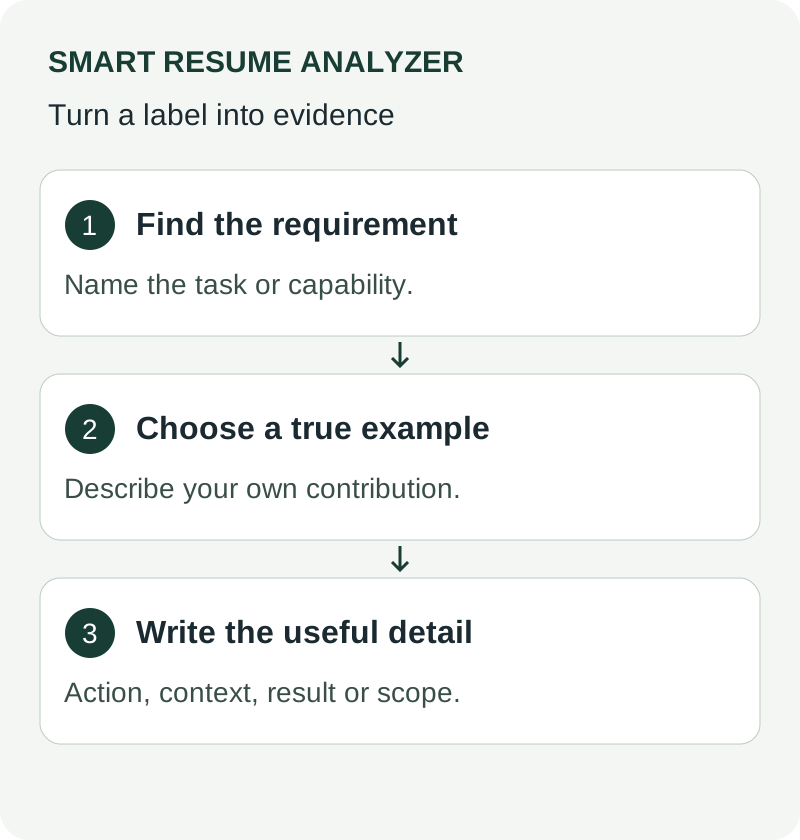
Start with one real vacancy
Paste the full posting into the keyword finder. Keep a copy of that posting beside the output. The extracted terms are suggestions for review, not proof that an employer uses those terms as an automatic filter.
Separate requirements from suggestions
Read each term in its original sentence. “Experience with SQL required” is different from “exposure to SQL is helpful.” Tools can lose this context. Mark each item as supported by your experience, a genuine gap, or irrelevant to your application before editing your resume.
Illustrative example: a term with two meanings
A posting asks for experience writing Java services. A resume describes JavaScript interfaces. Both involve programming, but adding Java would be inaccurate. Keep the real JavaScript work, describe any relevant service-integration experience, and acknowledge the actual language gap.
If the candidate instead wrote Java services but called them only “backend applications,” naming Java clarifies existing evidence. This is an illustrative editing example, not a measured analyzer response.
Place terminology where the evidence belongs
Name a technology in the relevant project or experience bullet. Use a skills section as a compact index to that evidence. Repeating a term throughout the document does not establish competence, and no keyword percentage guarantees shortlisting.
Use the job matcher to compare the revised document with the same vacancy. Review remaining gaps manually; do not add every suggestion simply to increase a score.
Read the output in three passes
- First, mark every term you can support with a specific piece of work.
- Second, mark the terms that describe real gaps, and decide honestly whether they matter for the role.
- Third, mark the terms that are noise, such as generic phrases in the company boilerplate.
Only the first group belongs on your resume. The second is information about whether to apply and what to say in an interview. The third can be ignored, which is easy to forget when a tool lists everything in the same style.
Which terms matter most
Weight a term more heavily when it appears in both the responsibilities and the requirements, when it is repeated, when it names a specific tool or method rather than a general quality, and when it sits near the top of the posting. A term mentioned once in a long list of nice-to-haves rarely deserves a rewrite.
Turn a matched term into evidence
Do not add the word to a skills list and stop. Find the bullet where you actually used it and make the term visible there, along with what you did and what changed. A single specific bullet does more for a person reading than five mentions in a list, and it still gives a keyword search something to find.
Work through a full posting
Suppose a posting for a data analyst role repeats SQL, dashboards and stakeholder reporting. Your resume mentions "built weekly reports for finance". The useful edit is to name what you used and for whom: "Wrote SQL queries and built dashboards for the finance team's weekly stakeholder reporting." The facts are the same; the wording now uses the role's language honestly.
Check your work against the same posting
After editing, compare the new version with the same job description using resume job match, then confirm the file still reads cleanly with the ATS parser. Reserve the next round of edits for genuine gaps, not for terms you cannot support.
How many keywords should a resume include?
There is no target number. Cover the terms that appear repeatedly in the posting and that you can honestly evidence, and stop there. A resume that reads naturally and matches the role's core language outperforms one stuffed with every extracted term.
Worked keyword map: requirement, evidence, placement
An illustrative posting asks for SQL reporting, dashboard maintenance, and stakeholder communication. A candidate who built a reporting project can map SQL to a query example, dashboard maintenance to refresh checks, and communication to the explanation delivered to project users. A requirement for a tool the candidate has not used remains a gap.
| Posting term | Candidate evidence | Resume placement |
|---|---|---|
| SQL reporting | Queries with documented grain and checks | Project bullet and Skills |
| Dashboards | A maintained report with metric definitions | Experience or Projects |
| Stakeholder communication | A presented recommendation | Supporting bullet |
| Unused platform | No evidence | Leave out; plan learning |
“Description keyword” and “description keywords” can refer to SEO metadata in other contexts. This guide addresses job-description terminology. For practical extraction use the job-description keyword finder, then confirm meaning and required-versus-preferred status manually. Suggested terms do not reveal the employer's hidden weighting.
Review extracted terms before using them
Sort extracted terms into responsibilities, tools, credentials, and employer background. “SQL,” “weekly reporting,” and “current license” represent different requirements and should not be treated as interchangeable keywords. For each important term, find truthful evidence in your resume. Keep a required qualification you lack on a gap list instead of inserting it into a skills section. Generic benefits and employer marketing text usually do not belong in application evidence. The existing keyword finder supports this workflow; manual review decides which terms actually matter.
Further guidance: CareerOneStop resume guide
Check keyword overlap without treating it as a hiring score
Paste the full responsibilities and qualifications into the job description keyword finder. Review the extracted terms against the original posting, separating required qualifications from preferences. Open the optional resume field to check whether those terms occur in your own text. This overlap cannot reveal an employer’s screening settings or decide whether you are qualified.
For each important gap, ask whether you have evidence from work, study or a project. If you do, describe that evidence clearly rather than repeating the term. If you do not, leave it out and consider whether the role or a learning goal is a better fit. Use the resume job description matcher for a separate review of your analyzed resume against one posting. Keep the original document so you can review every edit.
Harvard resume and cover-letter guidance explains how these documents present your experience for an employer; automated text feedback still needs your factual review.
Use These Tools Next
Use a working tool to apply this guidance to your own resume or job description.
Related Resume Pages
Explore related keyword and resume guidance pages to keep improving your application materials.
Using this guidance
Use these guides to check a specific part of your application. Automated feedback is guidance, not a hiring prediction. Check suggested edits against your own experience.
Related Articles
Continue with another guide on this topic.
Job Search Strategy
Preparing a Cover Letter for an Online Application
Make a cover letter readable, relevant, and consistent with your resume without assuming that every portal scores it.
Tool Guides
How To Use A Resume Tailoring Tool Without Rewriting Everything
A resume tailoring tool helps you customize one strong base resume for a target job without rewriting the whole document every time.
Resume Writing
ATS Resume Keywords 2025: What Recruiters Actually Want (Free Checklist)
Modern resumes still win on clarity, role fit, and credible proof more than on trend-driven design changes.