Simple Resume Template: A Copyable Structure With Examples
Use a simple resume structure with readable headings, relevant bullets, and an original starter. Learn what to keep, delete, and verify before applying.
A simple resume template keeps the reader's attention on your work. Use readable headings, consistent dates, and concise evidence. Simplicity should reduce layout friction without removing information the employer needs to evaluate you.
Copy this structure
YOUR NAME
City | Email | Phone | Relevant professional link

SUMMARY (optional)
Role or professional focus + relevant evidence.

EXPERIENCE
Job title — Employer | Month Year–Month Year
- Action + context + verified result or scope.

SKILLS
Relevant tools, methods, or current credentials.

EDUCATION
Qualification — Institution | Completion year

PROJECTS (when relevant)
Project name | Your role | Evidence of the work.
Download the text starter or Word-compatible version. These are original static files. You can edit them without signing up for another template service.
Replace prompts with evidence
For a fictional junior developer, a project bullet might say: “Built a booking API in Python, added duplicate-request tests, and documented setup steps for the project team.” The statement identifies the technology and the applicant's work without presenting coursework as employment.
For a support applicant, “Maintained the incident handover log for rotating shifts” is a useful scope description even when no reliable improvement percentage exists. Do not keep placeholder achievements merely because the template looks empty without them.
Decide which sections deserve space
A summary can help establish a specialized focus or explain a transition, but it is optional. A project section is useful when it adds evidence the employment history lacks. References, personal hobbies, and unrelated training do not need to be included automatically.
Order sections according to the strongest relevant evidence. Keep work history understandable even when older roles are brief. A simple layout is compatible with different career stages; it does not require everyone to use the same page count.
Check the submitted file
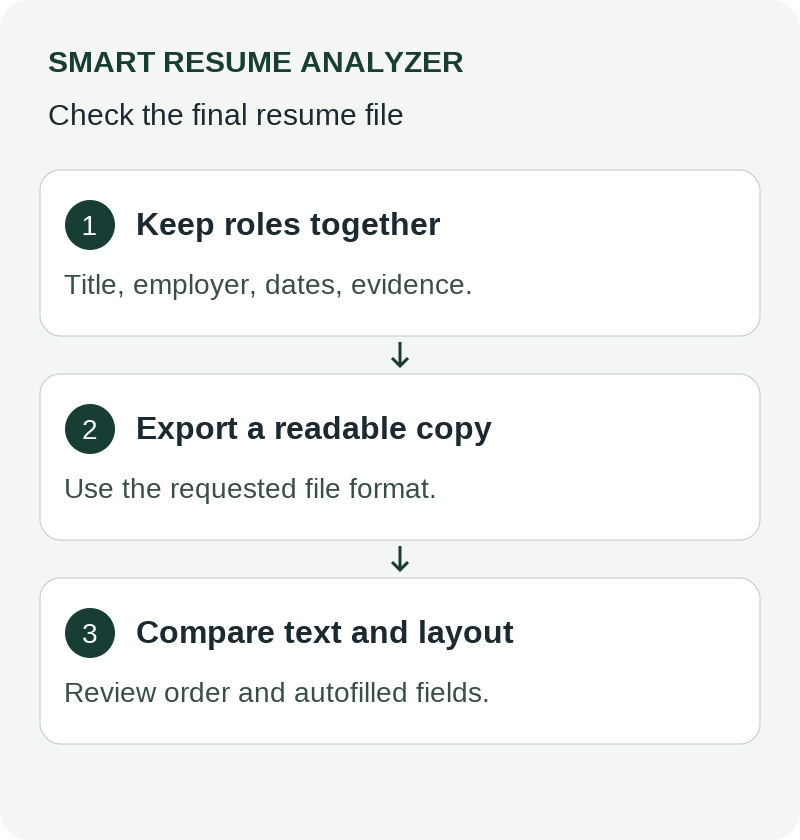
Keep the body as real text, not an image of text. Select and copy a role block to verify that the reading order is usable. Open the exported document and check that no heading is stranded at the bottom of a page. Review the application form's autofilled dates and titles after upload.
No template can guarantee parsing in every ATS. Follow the employer's accepted file types and use the readability checklist to find practical issues before sending.
Keeping it simple on purpose
A simple resume uses one column, one font and standard headings, and puts the content first. This helps readers scan the page and helps software read the text in order. Simplicity is not the same as blandness: specific, well-chosen bullets make a plain page stand out.
A reliable layout
- Name and contact details at the top in plain text.
- A two- or three-line summary.
- Experience in reverse-chronological order.
- Education, then skills or certifications.
Common mistakes to avoid
Do not shrink the font to fit more, and do not add icons, photos or progress bars. Avoid long paragraphs, and keep bullets to one or two lines.
Make it yours
Replace each placeholder with your own details and delete any section that does not help. Check the result with the ATS parser and build a clean version in the resume builder if you want a ready start.
Questions people ask
Is a simple resume too plain? Plain layout lets the content do the work. Strong, specific bullets are what set a resume apart, not its design.
How do I add personality? Through the choice of projects, results and a clear summary, not through colours or graphics.
Sources and further reading
Use These Tools Next
Use a working tool to apply this guidance to your own resume or job description.
Related Resume Pages
Explore related keyword and resume guidance pages to keep improving your application materials.
Using this guidance
Use these guides to check a specific part of your application. Automated feedback is guidance, not a hiring prediction. Check suggested edits against your own experience.
Related Articles
Continue with another guide on this topic.
ATS Optimization
Best ATS Resume Template Structure for 2026
The best ATS template is simple, readable, and structured around standard sections that make role fit easy to scan.
Resume Templates
Reverse Chronological Resume Template: Order and Examples
Build a reverse chronological resume with recent experience first, consistent dates, and relevant bullets. Includes a starter and a fictional role block.
Resume Tools
AI Resume Analyzer vs Resume Builder: What Job Seekers Actually Need
Resume builders help you create a draft. Resume analyzers help you improve one. Job seekers usually need both at different moments.