How to Tailor a Resume to a Job Description
How to tailor a resume to a job description: match keywords, reorder skills, and adjust bullets to improve ATS and recruiter fit - without lying.
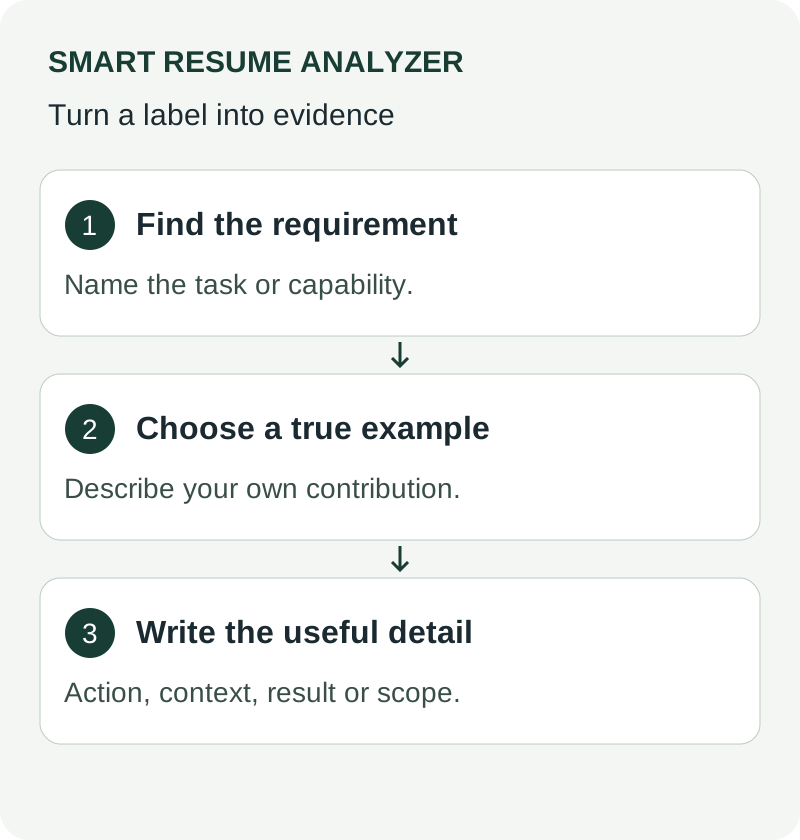
Module 1, Understand the job before you edit
Estimated time: 5 to 7 minutes
Concept overview
A strong resume edit starts with the job description, not the resume. The goal is simple. Find the skills, tools, and responsibilities the employer repeats, then match your content to those themes. That does not mean copying every line. It means identifying what matters most and presenting your experience in the same language.
A job description checker helps you spot gaps faster. A resume job description match process gives you structure, so you can decide where to focus. For example, if a role repeats “ATS,” “keyword,” and “resume parsing,” those terms deserve attention in your resume summary, skills, or experience bullets, if they reflect your real background. The same logic applies to a resume builder with ai workflow. The tool can help organize content, but you still need to choose what stays and what changes.
Guided walkthrough
- Open the job description and read it once from top to bottom.
- Highlight repeated words, tools, and responsibilities.
- Group those highlights into themes such as skills, tasks, and qualifications.
- Mark which items appear in the title, summary, requirements, and duties.
- Compare those themes to your resume sections.
Screenshot 1: Job description highlighting
- Callout A: Repeated skill terms
- Callout B: Required tools or platforms
- Callout C: Core responsibilities
Screenshot 2: Theme list
- Callout A: Skills group
- Callout B: Responsibilities group
- Callout C: Qualifications group
Hands-on exercise
Take one job description and create a simple three-column list:
- Keyword or phrase
- Where it appears
- Your matching resume evidence
Success criterion: You have at least 8 terms mapped to a resume example or a clear gap.
Knowledge check
- Why should you read the job description before editing the resume?
- What is the difference between a repeated skill term and a one-time mention?
- Which sections of a job description usually contain the strongest clues?
What we covered
- How to read a job description with purpose
- How to group keywords into themes
- How to begin a resume job description match
What’s next: Module 2, Build your keyword map
Module 2, Build a keyword map that guides edits
Estimated time: 5 to 7 minutes
Concept overview
A keyword map is your working sheet. It shows which terms matter most and where they belong in your resume. The map should stay practical. You do not need every word from the posting. You need the terms that reflect the role and your real experience.
For example, if a role says “ATS score,” “resume parsing,” and “job description checker,” those may belong in skills, summary, or a project bullet. If the posting says “cover letter builder” or “job-description matcher,” verify whether those ideas relate to your own work or process. Your map helps you avoid random edits. It also helps you keep the resume readable.
Guided walkthrough
- Make three priority tiers: high, medium, and low.
- Put repeated requirements in the high tier.
- Put supporting skills and tools in medium.
- Put nice-to-have terms in low.
- Assign each term to one resume section.
Screenshot 3: Keyword map table
- Callout A: Priority tier
- Callout B: Keyword or phrase
- Callout C: Resume section placement
Hands-on exercise
Create a keyword map with these categories:
- Summary
- Skills
- Experience
- Projects
- Certifications or education
Success criterion: Every high-priority term appears in at least one target section.
Knowledge check
- Why should high-priority terms appear more than once?
- Which terms belong in low priority?
- What is the purpose of assigning a section to each keyword?
What we covered
- How to create a keyword map
- How to rank terms by importance
- How to place terms into resume sections
What’s next: Module 3, Prioritize the right sections
Module 3, Prioritize the right sections first
Estimated time: 5 to 6 minutes
Concept overview
Not every section carries the same weight. Start with the sections a recruiter reads first and the sections that most quickly support ATS screening. Usually, that means the summary, skills, and recent experience. If those sections align well, the rest of the resume becomes easier to edit.
A resume builder can help you move sections around cleanly. That said, the order still matters more than the tool. Put the strongest matching evidence where it can be seen quickly. For example, a keyword such as “ATS readability reports” should appear only if it reflects your actual background. If you do not have direct experience, leave it out and focus on stronger evidence you can support.
Guided walkthrough
- Review the summary first.
- Check skills next.
- Move to your most recent and relevant experience.
- Review projects, education, and certifications last.
- Make sure your strongest matches appear early.
Screenshot 4: Resume section order
- Callout A: Summary block
- Callout B: Skills block
- Callout C: Experience block
Hands-on exercise
Reorder your resume sections so the most relevant content appears first.
Success criterion: Your summary, skills, and top experience bullet points support the role before the reader reaches the lower sections.
Knowledge check
- Which sections should you review first?
- Why does section order matter for matching?
- What should you do if a keyword does not reflect your experience?
What we covered
- Which sections carry the most weight
- How to order content for faster scanning
- How to keep edits honest and relevant
What’s next: Module 4, Decide what to rewrite
Module 4, Decide what to rewrite versus leave unchanged
Estimated time: 5 to 7 minutes
Concept overview
This is where many resumes go wrong. People rewrite too much. A better approach is selective editing. Rewrite only the lines that miss the role, feel too generic, or leave out key terms from your keyword map. Leave unchanged the bullets that already show strong, relevant proof.
A good rule helps here. If a bullet already expresses a solid result or responsibility that matches the role, keep it. If it uses vague language, update it. For example, a line that says “worked on resumes” is too broad. A line that says “used resume analysis to improve ATS readability” is more specific, but only keep it if it is true for your background. The goal is clarity, not decoration.
Guided walkthrough
- Mark each bullet as keep, rewrite, or remove.
- Keep bullets that already match the role.
- Rewrite bullets that need stronger keywords or clearer outcomes.
- Remove bullets that do not support the target job.
- Check that rewritten bullets still sound natural.
Screenshot 5: Bullet decision list
- Callout A: Keep label
- Callout B: Rewrite label
- Callout C: Remove label
Hands-on exercise
Pick five bullets from your resume and label each one.
Success criterion: You can explain why each bullet stays, changes, or goes.
Knowledge check
- When should you leave a bullet unchanged?
- What makes a bullet too generic?
- Why should rewritten bullets still sound natural?
What we covered
- How to sort bullets by editing need
- How to protect strong content
- How to avoid over-editing
What’s next: Module 5, Rewrite with precision
Module 5, Rewrite with precision and keep the wording natural
Estimated time: 5 to 7 minutes
Concept overview
Precise rewriting means small, targeted changes. You add the right terms where they belong, keep the meaning accurate, and avoid stuffing keywords into every sentence. Search engines and ATS tools respond to clear phrasing, but hiring teams still value readable content.
A resume vs job description comparison works best when the language stays direct. For example, if the job asks for “keyword extraction” and your work involved identifying relevant terms, you can reflect that clearly. If the job mentions “exportable analysis reports,” do not add it unless that is part of your actual experience. Good rewriting improves fit. It does not invent fit.
Guided walkthrough
- Rewrite the summary to reflect the role’s main theme.
- Update skills so they match the actual tools and terms.
- Refine experience bullets with direct language.
- Keep sentence structure simple.
- Read each line aloud to check flow.
Screenshot 6: Before and after bullet
- Callout A: Original phrasing
- Callout B: Revised phrasing
- Callout C: Keyword placement
Hands-on exercise
Rewrite three bullets from your resume using the keyword map.
Success criterion: Each rewritten bullet is clearer, more specific, and still accurate.
Knowledge check
- What is the risk of adding too many keywords?
- What should stay the same when you rewrite a bullet?
- Why does reading aloud help?
What we covered
- How to rewrite without overdoing it
- How to keep content accurate
- How to improve fit while staying readable
What’s next: Module 6, Check alignment before you apply
Module 6, Check alignment before you apply
Estimated time: 4 to 6 minutes
Concept overview
The final review catches simple misses. This is where a job description checker or a structured manual review can help you see what still needs attention. Look for missing high-priority terms, weak summary wording, and sections that no longer support the role. Also check for repetition. If the same idea appears in too many places, you may have over-edited one area and under-edited another.
A good final review asks one question. Does the resume now reflect the job description without sounding forced? If the answer is yes, you are close. If the answer is no, revise the weakest section first. In practice, that usually means the summary or the top experience bullet points.
Guided walkthrough
- Compare the resume to your keyword map.
- Check whether each high-priority term appears naturally.
- Review section order one more time.
- Fix any weak or vague bullets.
- Save the final version for the application.
Screenshot 7: Final alignment checklist
- Callout A: Needed terms
- Callout B: Present terms
- Callout C: Missing terms
Hands-on exercise
Run a final pass across your resume and mark any remaining gaps.
Success criterion: You can point to each high-priority term and show where it appears.
Knowledge check
- What should you check after rewriting?
- Why is repetition across sections useful?
- What do you fix first if the resume still feels weak?
What we covered
- How to run a final alignment check
- How to catch missing terms
- How to confirm the resume still reads naturally
What’s next: Module 7, Use the process again for the next role
Module 7, Repeat the process for each application
Estimated time: 3 to 5 minutes
Concept overview
Tailoring a resume is not a one-time task. Each role brings a different mix of keywords, priorities, and section emphasis. A repeatable process saves time and reduces guesswork. Once you have a keyword map, a priority system, and a rewrite method, the next application becomes faster.
That is where a resume builder with ai workflow can help support your process, especially when you want to organize versions faster. Even then, the same principle holds. Use the tool for structure, then review the content yourself. The strongest results come from a clear process, not from blind automation.
Guided walkthrough
- Save a master resume.
- Duplicate it for each new role.
- Update the keyword map.
- Edit only the sections that matter most.
- Store the final version with the job title in the file name.
Screenshot 8: Versioned resume files
- Callout A: Master resume
- Callout B: Role-specific copy
- Callout C: Final export
Hands-on exercise
Create one master version and one tailored version.
Success criterion: You can explain the difference between the two versions in one sentence.
Knowledge check
- Why should you keep a master resume?
- What changes most often from one role to another?
- Why is version control helpful?
What we covered
- How to reuse a repeatable workflow
- How to manage multiple resume versions
- How to save time on future applications
What’s next: Glossary, troubleshooting, and cheat sheet
Summary and takeaways
Tailoring a resume works best when you follow a sequence. Read the job description first. Build a keyword map. Prioritize the highest-value sections. Then decide what to rewrite and what to keep. That process helps you improve your resume job description match without losing clarity.
The key rule is simple. Match the role with evidence you can support. Use terms like resume builder, job description checker, resume builder with ai, and resume vs job description as part of a practical workflow, not as a substitute for judgment. A well-tailored resume stays accurate, readable, and focused on the requirements that matter most.
Glossary, troubleshooting, and cheat sheet
Glossary
- ATS: Applicant Tracking System. Software that sorts and screens resumes.
- Keyword map: A list of important terms from a job description and where they fit in your resume.
- Resume job description match: The degree to which your resume reflects the role’s requirements.
- Job description checker: A tool or process used to review keyword alignment.
- Resume builder: A tool for creating and editing resumes in a structured format.
Troubleshooting
If your resume still feels generic
- Recheck the summary.
- Look for missing high-priority terms.
- Replace broad phrases with role-specific language.
If you see too little alignment
- You probably mapped the wrong terms.
- Return to the job description and focus on repeated requirements.
If the resume sounds unnatural
- You probably added too many keywords.
- Remove the wording that does not sound like your own experience.
If you are unsure what to edit
- Start with the top third of the resume.
- Then move to the bullets under your most relevant role.
Downloadable cheat sheet
Resume tailoring checklist
- Read the job description.
- Highlight repeated terms.
- Build a keyword map.
- Prioritize summary, skills, and recent experience.
- Mark bullets as keep, rewrite, or remove.
- Rewrite only what needs stronger alignment.
- Check for natural language.
- Save a role-specific version.
Fast final review
- Does the summary reflect the role?
- Do the skills match the posting?
- Do the strongest bullets show relevant evidence?
- Are the keywords present without sounding forced?
- Does the final version still read clearly?
Module recap
You now have a repeatable process for tailoring a resume to a job description. Start with the posting, map the keywords, prioritize the right sections, and edit with restraint. That approach gives you a clearer, stronger application package and a cleaner path to submit with confidence.
Related tools
Match requirements to evidence, not just counts
Create three columns: requirement, evidence you have, and change needed in the resume. For an illustrative requirement of SQL reporting, record the report you actually built, who used it, and where that evidence appears. Mark a skill you do not have as a gap rather than adding the term. The existing job-match tool can support comparison, but its result is not an employer score or hiring probability. Check important credentials and responsibilities manually even when a numerical match looks strong.
Use These Tools Next
Use a working tool to apply this guidance to your own resume or job description.
Related Resume Pages
Explore related keyword and resume guidance pages to keep improving your application materials.
Using this guidance
Use these guides to check a specific part of your application. Automated feedback is guidance, not a hiring prediction. Check suggested edits against your own experience.
Related Articles
Continue with another guide on this topic.
AI & Technology
AI Resume Analyzer 2025: Understanding ATS Systems and Resume Optimization
AI resume analysis is most valuable when it speeds up revision loops and points to better edits, not just better scores.
Resume Guides
How to Tailor a Full-Stack Resume by Role
How to tailor a full-stack resume for frontend-heavy, backend-heavy, or balanced roles by matching keywords and reordering skills.
Resume Tailoring
How to Match an IT Resume to a Job Description
Match a software or IT resume to a posting for better ATS results: which terms matter, where they belong, and how to check coverage.