How to Tailor Your Resume Keywords to a Job Description (Without Keyword Stuffing)
Place a posting’s real skills in your headline and bullets, and avoid keyword stuffing on resume lines you cannot explain in an interview.
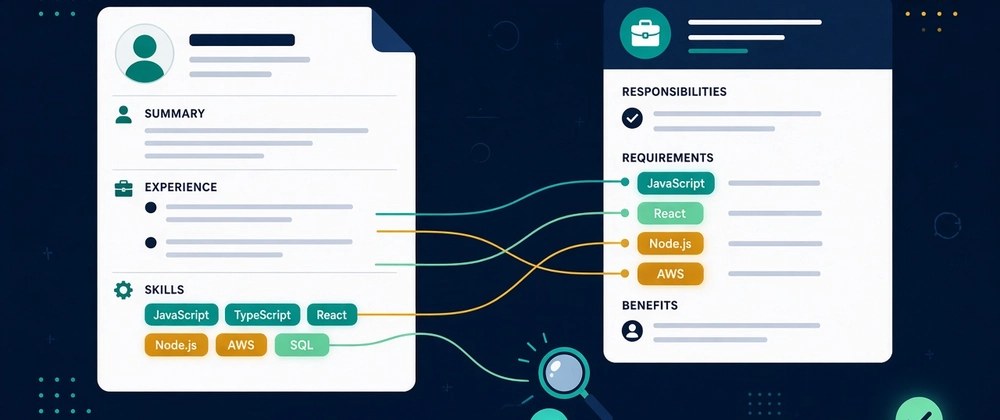
Most job seekers I talk to have one resume. They send that same file to a backend role, a full-stack role and a DevOps-flavoured role in the same afternoon, then wonder why nothing comes back.
I'm Muhammad Ali Mughal, and I built Smart Resume Analyzer, a free AI resume and ATS checker. After looking at a lot of resumes next to the job posts they were sent to, the pattern is hard to miss: the resume often describes the right experience in the wrong words. A recruiter searching the ATS for "PostgreSQL" won't find you if your resume only says "databases."
Tailoring fixes that. It doesn't mean rewriting your life story for every application. It means spending 20 to 30 minutes making sure the words in the posting that genuinely describe you also appear in your resume, in the places that matter. Here's the process I use. The longer course on how to tailor a resume to a job description covers section order and versioning. This page stays on wording: how to avoid keyword stuffing on resume copy while the terms you really have still show up.

Why exact wording matters
Applicant tracking systems store your resume as text. Recruiters then filter and search that text, often by skills, job titles and tools. Some systems are smarter about synonyms than others, but you can't know which one you're dealing with, so the safest assumption is simple: if the posting says it and you have it, say it the same way.
Humans skim too. A hiring manager gives a resume a few seconds on the first pass. When the first third of the page mirrors the language of their own job description, it reads as a fit before they've thought about it.
Step 1: Pull the keywords out of the posting
Copy the full job description into a plain text file, then sort what you find into four buckets:
- Hard skills and tools: languages, frameworks, platforms, certifications (Python, React, AWS, Kubernetes, Tableau, PMP).
- Job titles and role terms: "Senior Backend Engineer," "Product Analyst," "Customer Success Manager."
- Domain words: "payments," "B2B SaaS," "healthcare compliance," "high-traffic e-commerce."
- Soft skills tied to outcomes: "stakeholder management," "mentoring," "cross-functional delivery."
Pay attention to where each term appears. Words under "Requirements," "Must have" or "Minimum qualifications" matter more than words under "Nice to have." Words that repeat across the responsibilities and the requirements are usually the core of the role.
If you'd rather not do this by hand, I built a free job description keyword finder that runs in your browser. Paste the posting, and it groups possible keywords and flags terms tied to requirement cues. You can also paste your resume to see the text overlap. Treat its output as a starting list, not as the employer's secret scoring rules. Always check each term against the original wording.
Step 2: Mark what you genuinely have
Go through your list and mark each keyword:
- Have it, already on my resume (same wording)
- Have it, but worded differently (you wrote "CI pipelines," they wrote "GitHub Actions")
- Partially have it (used it on one project, not in production)
- Don't have it
The second group is where most of the easy wins are. The last group is where people get into trouble. Never add a skill you don't have. It might get you past a filter, but it will come apart in the first technical interview, and that's a worse outcome than not getting the call.
Step 3: Put keywords where they carry weight
Dumping 40 terms into a skills section is the most common mistake I see. It looks like a keyword list because it is one. Instead, spread the important terms across three places:
Your headline and summary
The top of the page should use the job title from the posting (if it honestly matches your level) and two or three of its core requirements.
Before:
Software engineer with experience building web applications.
After:
Backend engineer with 4 years building Python and PostgreSQL services for payments products, focused on API reliability and performance.
Same person, same experience. The second version just speaks the posting's language.
Your experience bullets
This is where keywords prove themselves. A skill mentioned inside a real accomplishment is far more convincing than a skill in a list. The pattern for those lines is in how to write resume bullet points that quantify impact.
Before:
Built reporting tools for the support team.
After:
Built Python reporting scripts and SQL queries used daily by the support team, cutting weekly report prep from 5 hours to 1.
Only include numbers you can back up. If you don't have a metric, describe the scope instead (team size, number of users, frequency).
Your skills section
Use this for exact-match coverage of the tools you really use. Group them so a human can scan it: Languages, Frameworks, Cloud & DevOps, Data. Include both the acronym and the full term once where it's common, for example "Amazon Web Services (AWS)" or "Search Engine Optimization (SEO)."
Step 4: Match the posting's spelling and format
Small differences can matter to a text search:
- Spelling and casing: "Node.js" vs "NodeJS," "PostgreSQL" vs "Postgres." Use the version in the posting.
- Singular vs plural and verb forms: "data pipeline" vs "data pipelines." Not usually a dealbreaker, but mirroring is free.
- Certifications: write the full official name at least once.
- Job titles: if your official title was unusual ("Engineer II, Platform Squad"), you can add a clarifying title in brackets, for example "Engineer II (Backend Engineer)," as long as it's accurate.
Step 5: Keep it readable for humans
A tailored resume should read better, not worse. A quick self-check:
- Does each bullet still say what you did and why it mattered?
- Does any keyword appear so often it sounds robotic? Two or three natural mentions of a core skill are plenty. How much resume keyword repetition is useful explains where to stop.
- Could you talk comfortably for two minutes about every skill on the page?
If a sentence only exists to hold a keyword, rewrite it or delete it.
Step 6: Check the match before you send
Once you've edited, compare the resume against the posting one more time. Look for required terms you have but still haven't mentioned, and for formatting that might trip up parsing (tables, text in headers, multi-column layouts, skills inside images).
This is exactly the loop I built Smart Resume Analyzer for. You upload your resume, paste the job description, and the resume score calculator shows an ATS-style score, missing keywords and suggestions for rewording. I use the ATS resume checker as a final check, then I read the resume once more as a human before sending.
Make tailoring fast: the base + variant method
Tailoring every application from scratch is exhausting. What works better:
- Keep one master resume with every project, tool and metric you could ever use. It can be three pages; nobody sees it.
- Create a base version for each type of role you apply to (for example "backend," "data engineering").
- For each application, copy the closest base and spend 20 minutes on Steps 1 to 6.
- Save each version with the company and role in the file name so you know what you sent.
After the first few, you'll find that most postings in your field share 70 to 80 percent of their keywords. Tailoring becomes a short edit rather than a rewrite.
A quick checklist
- Keywords pulled from the posting and sorted by importance
- Job title and two or three core skills in the headline or summary
- Key skills proven inside experience bullets
- Spelling matches the posting (Node.js, PostgreSQL, etc.)
- Acronym and full term used once for common terms
- No skills you can't defend in an interview
- Simple single-column layout, standard section headings
- Final match check against the posting
Try it on your next application
Pick the job you most want right now and run through this once. Start with the job description keyword finder, make your edits, then run the result through the ATS resume checker and the resume score calculator. The checker and keyword finder are free to use.
If you want to find the tools again later, bookmark Smart Resume Analyzer.
Sources and further reading
These pages are independent references for the advice in "How to Tailor Your Resume Keywords to a Job Description". Read them alongside this guide and follow your target employer's own instructions where they differ.
Use These Tools Next
Use a working tool to apply this guidance to your own resume or job description.
Related Resume Pages
Explore related keyword and resume guidance pages to keep improving your application materials.
Using this guidance
Use these guides to check a specific part of your application. Automated feedback is guidance, not a hiring prediction. Check suggested edits against your own experience.
Related Articles
Continue with another guide on this topic.
Resume Guides
How to Tailor a Resume to a Job Description
How to tailor a resume to a job description: match keywords, reorder skills, and adjust bullets to improve ATS and recruiter fit - without lying.
ATS Optimization
Resume Sections That ATS Ignores (And Where to Actually Put Your Best Keywords)
Check whether important resume text survives extraction, and keep essential information in clearly labeled sections.
AI & Technology
AI Resume Analyzer: Understanding ATS Systems and Resume Optimization
AI resume analysis is most valuable when it speeds up revision loops and points to better edits, not just better scores.