AI Cover Letter Optimization for IT Applications
Learn how AI cover letter optimization helps IT candidates tailor applications faster with a better **cover letter builder** and resume alignment.
Introduction
Applying for IT jobs takes more than a strong resume. Many candidates send the same cover letter to every role, then wonder why responses stay low. Recruiters notice that quickly. So do applicant tracking systems, where keyword fit and role alignment matter.
A tailored cover letter still has weight. It gives context that a resume cannot. It shows why a candidate wants a specific role, how their skills connect, and which projects support that match. Smart AI tools can speed up that work without making the letter sound copied or generic.
This matters most for people applying to multiple roles. A good process helps them adjust one draft for each job, keep the message clear, and move faster across applications.
Key takeaways
Tailored cover letters still help IT candidates stand out.
AI can speed up customization without replacing human judgment.
A simple structure keeps letters specific and easy to adapt.
A cover letter builder can support faster job-by-job editing.
Why do IT cover letters still matter?
A resume lists experience. A cover letter connects that experience to a job. That difference matters when a hiring team wants to see how a candidate thinks, communicates, and fits the role.
IT jobs often ask for a blend of technical skills, project results, and collaboration. A well-written cover letter can highlight all three in a compact format. It can also explain career changes, niche experience, or a direct match to a specific stack or workflow.
Generic letters miss that opportunity. They sound broad. They also force recruiters to guess which skills relate to which job. Tailored letters remove that friction.
What changes in IT applications?
IT candidates often apply to several similar roles at once. One role may emphasize cloud work. Another may focus on backend systems, testing, or support. The structure stays similar, but the details should shift.
A tailored letter lets candidates adjust:
the skills they mention
the projects they feature
the outcomes they describe
the reason they want that role
That kind of precision helps the letter feel relevant. It also keeps the application aligned with the resume and job description.
How can AI speed up cover letter customization?
AI helps most when it handles the first draft. A candidate still needs to review it, edit the language, and make the fit personal. The value comes from speed and structure.
A cover letter generator can turn a draft into a job-specific starting point. A resume and cover letter builder can also keep the two documents aligned, so the story stays consistent across the application. That matters when the same candidate is applying to several roles in the same week.
AI is also useful for repetition. Many cover letters need the same base sections. The difference lies in the details. AI can help draft the framework, then the candidate can swap in role-specific skills, tools, and project wins.
What should AI handle, and what should the candidate handle?
AI should handle:
the opening draft
basic structure
simple rewording
faster versioning for different roles
The candidate should handle:
final skill choices
project examples
role-specific alignment
tone and accuracy
That balance matters. A letter that sounds too polished and too broad can feel empty. A letter that includes the candidate’s own project language feels more credible.
What makes an IT-specific cover letter feel tailored?
A strong IT cover letter does not need long paragraphs. It needs the right details in the right places. The reader should be able to see the match quickly.
The best letters connect three things:
the role description
the candidate’s skills
the project outcome or result
That structure works well because it keeps the letter concrete. It also reduces filler. Candidates do not need to explain everything they have done. They need to show why they fit this role.
Skills, projects, and alignment
Skills should not appear as a random list. They should support the job. If the role asks for automation, testing, or platform support, the letter should mention the matching experience clearly.
Project outcomes should also stay specific. A candidate can refer to a system they helped improve, a workflow they supported, or a feature they delivered. The point is not to pile on details. The point is to show relevance.
Role alignment closes the loop. It tells the reader why the candidate wants this position, not just any position. That line often separates a generic note from a useful one.
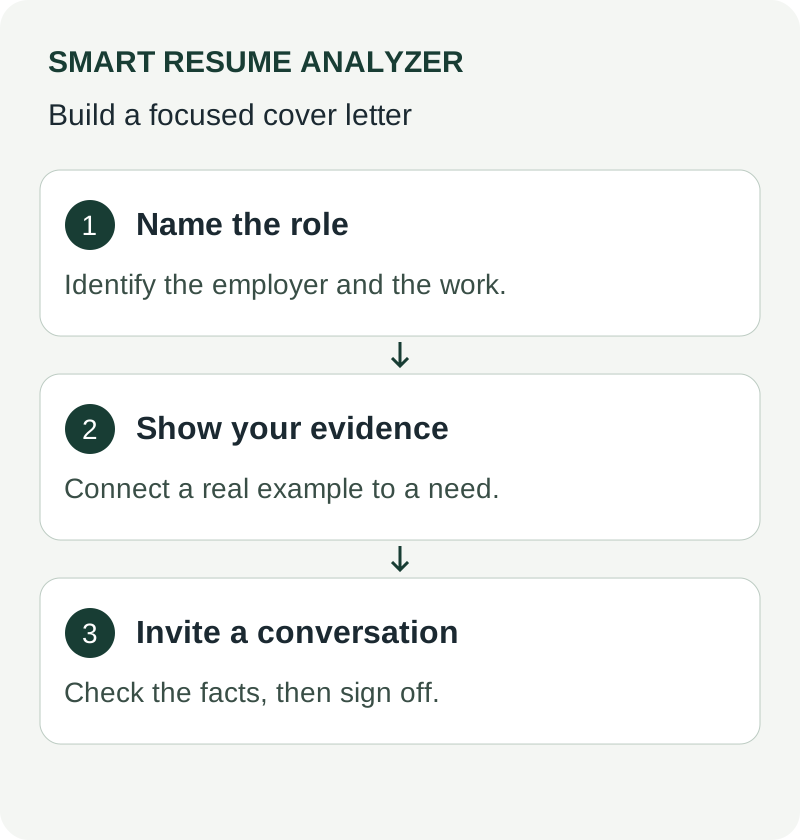
How do you write a simple structure that works?
A simple structure makes customization easier. It also keeps the letter readable for busy recruiters. The format below works well for IT candidates who need a fast, flexible template.
1. Opening paragraph
Start with the role and the reason for interest. Keep it direct. Mention the specific position and one short reason the candidate sees a fit.
Example:
“I am writing to apply for the Software Engineer role at your team. My experience in backend development and project delivery makes this position a strong match.”
2. Middle paragraph on skills and project outcomes
Use one or two examples. Connect each skill to a result.
Example:
“I have worked on projects involving Python, APIs, and system support. In those roles, I focused on reliable execution, clear handoffs, and practical improvements that supported delivery.”
This section should stay grounded. Candidates should avoid inflated language. They should show what they did and why it matters.
3. Middle paragraph on role alignment
Explain why the job fits the candidate’s direction. This is where industry focus helps.
Example:
“This role appeals to me because it combines hands-on technical work with problem solving across systems. That blend matches the type of work I want to continue building.”
4. Closing paragraph
End with a professional line that invites follow-up. Keep it short.
Example:
“Thank you for your time and consideration. I would welcome the chance to discuss how my background could support your team.”
What should IT candidates include, and what should they skip?
Specificity helps. So does restraint. A strong cover letter says enough to be useful, then stops.
Candidates should include:
the target role name
relevant tools or skills from the job
one or two project examples
a short statement of interest in the role
Candidates should skip:
long career histories
skill lists copied from the resume
vague praise of the company
generic claims like “I am hardworking”
That approach keeps the letter focused. It also makes the application feel written for the job, not mass-produced.
A quick example of better wording
Weak:
“I have many technical skills and would be a great fit.”
Stronger:
“I have worked on backend tasks, project support, and delivery-focused problem solving, which aligns with the needs of this role.”
The second version says less, but means more.
How can Smart help with this workflow?
Smart offers a cover letter builder and a cover letter generator as part of its resume-focused solutions. It also provides a resume builder, a resume builder with AI, and job-description matching support. That combination helps candidates keep their resume and cover letter aligned while they apply to multiple roles.
The workflow is practical. A candidate can analyze a resume, compare it with a job description, and use the builder tools to shape a more relevant application. The editorial guidance also helps turn analysis into edits that support recruiter review and ATS screening.
That matters for IT candidates who move between roles with similar but not identical requirements. The same base profile can be adjusted quickly, with the cover letter doing more of the job-specific work.
Why this matters for customers
Customers do not just need another writing tool. They need a solution that helps turn application data into usable content. That is where an integrated approach makes sense.
Instead of treating the cover letter as an afterthought, Smart lets candidates build it alongside the resume. That improves consistency. It also saves time when the same person is applying to several roles.
A cover letter works best when it feels specific, not decorated.
What is the best next step for IT job seekers?
Start with one job description. Then write one focused cover letter for that role. Keep the structure simple. Use the job title, a matching skill, one project outcome, and a short note on role fit.
If that process feels slow, use a tool that supports the first draft. Smart’s cover letter builder can help turn a base version into a tailored letter faster. From there, review the language, make it specific, and keep the tone natural.
That is the real advantage of AI cover letter optimization. It does not replace the candidate’s voice. It gives that voice a faster path to the page.
Conclusion: A clearer way to apply
IT candidates still need cover letters when the job asks for focus, clarity, and role alignment. A tailored letter adds context that the resume cannot. It also helps candidates explain their skills in a way that fits the position.
AI makes that process faster. The right workflow supports customization, keeps the letter from sounding generic, and helps candidates apply to more roles with less repetition. For job seekers managing several applications at once, that can make a real difference.
Ready to write stronger IT cover letters faster? Try Smart’s cover letter builder and start building application-ready drafts with better alignment today.
Related tools
Use These Tools Next
Use a working tool to apply this guidance to your own resume or job description.
Related Resume Pages
Explore related keyword and resume guidance pages to keep improving your application materials.
Using this guidance
Use these guides to check a specific part of your application. Automated feedback is guidance, not a hiring prediction. Check suggested edits against your own experience.
Related Articles
Continue with another guide on this topic.
Job Search Strategy
Preparing a Cover Letter for an Online Application
Make a cover letter readable, relevant, and consistent with your resume without assuming that every portal scores it.
Cover Letters
Cover Letter Review Checklist Before You Apply
The Challenge A strong draft can still miss the mark. Small issues in tone, structure, or formatting can weaken an application before a recruiter reads the f…
Cover Letters
Cover Letter Templates That Help You Apply Faster
Cover letter templates that help you apply faster, with a simple ATS-friendly structure you can tailor to any job in minutes.